How to Keep Hands Warm While Typing: The Ultimate Guide to Touchscreen Gloves
Discover innovative solutions for maintaining warmth and productivity during cold weather typing sessions.
In our increasingly digital world, cold hands can significantly impact productivity and comfort when working on devices. This comprehensive guide explores the science behind cold hands during typing, examines the limitations of traditional gloves, and reveals how modern touchscreen gloves provide the perfect solution. Whether you're working outdoors, commuting, or simply in a chilly office, you'll learn how to maintain dexterity and warmth without sacrificing device functionality.
The Science of Cold Hands and Typing Efficiency
When temperatures drop, our bodies prioritize core warmth by reducing blood flow to extremities. This natural response causes finger stiffness and reduced dexterity that can decrease typing speed by up to 30% according to ergonomic studies. Traditional solutions like fingerless gloves or periodic hand-warming breaks provide incomplete relief and disrupt workflow.
Why Traditional Gloves Fail Tech Users
Standard winter gloves create a physical barrier between your fingers and device screens. The materials used in most gloves touch screen men and women's styles are incompatible with capacitive touchscreens that require electrical conductivity from your skin. This leaves you with three frustrating options: remove gloves entirely (exposing hands to cold), use awkward styluses, or struggle with unresponsive screens.
The Evolution of Touchscreen-Compatible Handwear
The development of specialized touch screen compatible gloves represents a significant advancement in wearable technology. Early versions used conductive threads only in the index fingers, but modern designs incorporate conductive materials across all fingertips for natural typing and swiping. Today's premium options like Seibertron touchscreen gloves combine advanced materials with ergonomic design for optimal performance.
Touchscreen Glove Technology Explained
Understanding how gloves that work with phone technology actually functions helps in selecting the right pair. Touchscreens detect the electrical charge from human skin - a property most glove materials block. Quality touchscreen gloves solve this through:
- Conductive Threads: Woven into touch screen fingertips to transmit your natural electrical charge
- Conductive Coating: Special polymer applications on fingertips
- Hybrid Materials: Combining conductive elements with traditional fabrics
Material Innovations in Modern Touch Gloves
The most effective best touchscreen gloves combine multiple advanced materials:
| Material | Warmth Level | Durability | Touch Sensitivity | Best For |
|---|---|---|---|---|
| Leather (leather touchscreen gloves) | Medium-High | Excellent | Good (requires conductive treatment) | Urban use, professional settings |
| Merino Wool | High | Good | Excellent | Extreme cold, outdoor activities |
| Fleece & Synthetic Blends | Medium | Good | Excellent | Everyday use, casual settings |
| Waterproof Membranes (waterproof touch screen gloves) | Varies | Excellent | Good (with proper fingertip design) | Wet conditions, snow activities |
Choosing the Best Touchscreen Gloves
Selecting the right gloves you can use a touch screen with requires considering several factors:
Key Features for Optimal Performance
- Full-Hand Compatibility: Look for gloves that work across all fingers, not just index fingers
- Precision Touchpoints: Strategically placed conductive materials for accurate typing
- Ergonomic Design: Pre-curved fingers and flexible knuckles for natural hand positioning
- Thermal Regulation: thermal touchscreen gloves with appropriate insulation for your climate
- Moisture Management: Breathable materials to prevent sweaty hands during extended use
Specialized Options for Different Needs
The market offers specialized solutions for various users and environments:
For Professional Settings
Leather touchscreen gloves provide a sophisticated look while maintaining functionality. These often feature:
- Minimalist design suitable for office environments
- Thinner conductive materials for enhanced sensitivity
- Wind-resistant treatments for commuting protection
For Extreme Conditions
Waterproof touch screen gloves with thermal insulation are essential for:
- Skiing, snowboarding, and winter sports
- Outdoor work in wet conditions
- Cold climate commuting
Premium Solution: Seibertron Leather Touchscreen Gloves
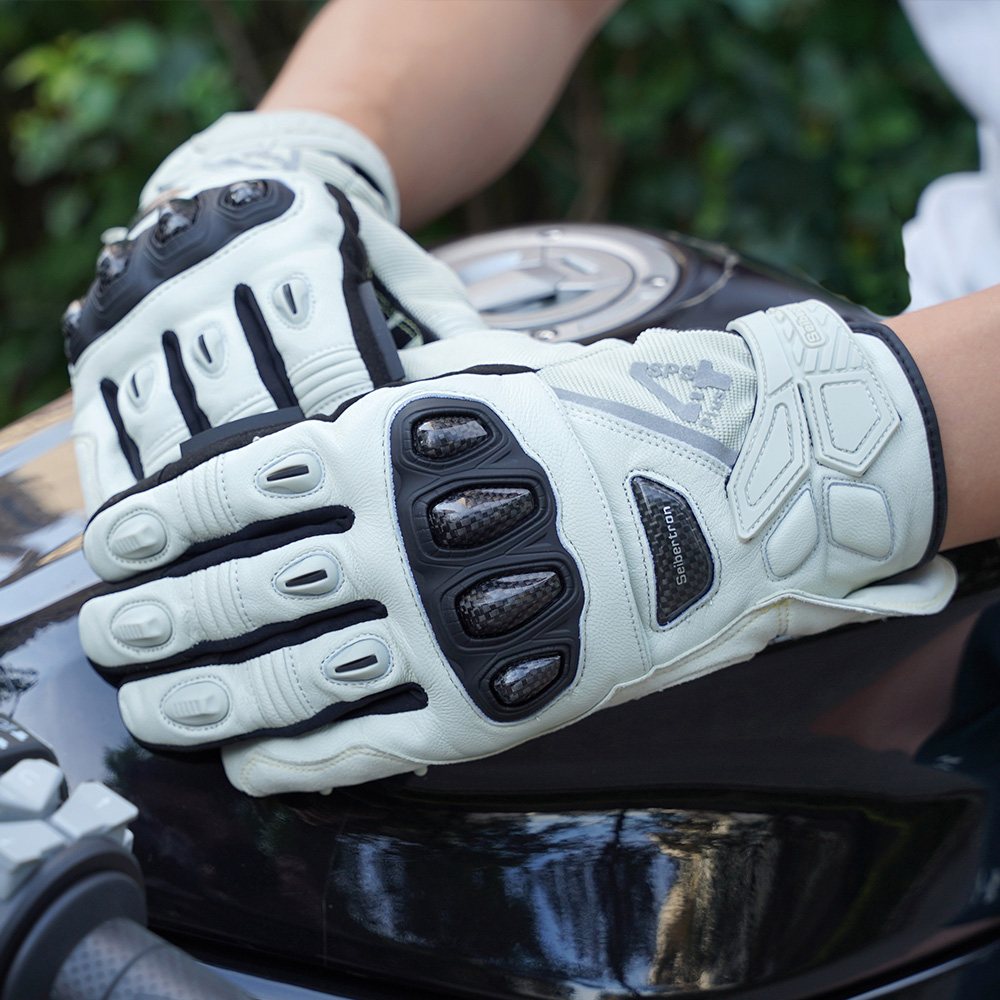
Our CE Certified Leather Motorcycle Gloves represent the pinnacle of touchscreen glove technology. These gloves feature:
- Premium goatskin leather with reinforced palms
- Advanced conductive threading across all fingertips
- Thermal lining rated for -15°C (5°F)
- Water-resistant treatment without sacrificing breathability
- CE certification for impact protection
Gender-Specific Touchscreen Glove Solutions
Hand physiology differs between genders, making specialized designs essential for optimal comfort and performance.
Men's Touchscreen Gloves
When selecting gloves for men touch screen needs, consider these factors:
- Broader palm designs and longer finger proportions
- Reinforced palms for durability during activities
- Higher insulation thresholds for typically colder hands
- Specialized men's winter gloves for texting with enhanced thumb mobility
Women's Touchscreen Gloves
The best women's winter gloves touch screen options address specific needs:
- Proportionally smaller palm sizes and shorter fingers
- Thinner insulation materials that maintain dexterity
- Fashion-forward designs and color options
- Enhanced circulation features for typically colder hands
Maximizing Warmth and Functionality
Beyond selecting the right gloves, implement these strategies for optimal hand warmth during typing:
Ergonomic Techniques for Warmer Hands
- Maintain proper posture to improve blood circulation
- Implement regular stretching routines (every 30 minutes)
- Use heated desks or mouse pads as supplementary heat sources
- Position yourself away from cold drafts and windows
Environmental Adjustments
Create a workspace that minimizes cold stress:
- Optimize room temperature between 20-22°C (68-72°F)
- Use task lighting to provide localized warmth
- Position your workspace away from exterior walls and windows
- Consider under-desk heating solutions for extreme conditions
Troubleshooting Common Issues
Even with quality good touch screen gloves, users sometimes encounter challenges:
When touch screen gloves not working
If your gloves stop working with touchscreens:
- Check Conductive Tips: Ensure they're clean and not worn down
- Test Different Devices: Some screens require more conductivity
- Moisturize: Extremely dry skin reduces conductivity
- Reset Screen: Clean your device screen with appropriate solution
- Check for Damage: Inspect for worn areas on fingertips
Maintaining Optimal Performance
Extend the functional life of your best screen touch gloves with proper care:
- Follow manufacturer washing instructions precisely
- Air dry instead of machine drying
- Store flat to maintain conductive material integrity
- Apply leather conditioner to leather touchscreen gloves every 3-6 months
Frequently Asked Questions
Touchscreen gloves work by incorporating conductive materials (usually silver or carbon-based threads) into the glove fingertips. These materials allow the electrical charge from your skin to pass through to the device screen, mimicking direct skin contact that capacitive touchscreens require to register input.
Quality touch screen compatible gloves work with most capacitive touchscreens found on smartphones, tablets, and many modern laptops. However, some devices with particularly sensitive or less sensitive screens may experience varying results. Always check compatibility information before purchasing.
Cleaning methods vary by material:
- Leather: Wipe with damp cloth, use leather cleaner monthly
- Wool/Fleece: Hand wash in cold water with mild detergent
- Synthetics: Machine wash cold (gentle cycle) in laundry bag
Always air dry away from direct heat to preserve conductive elements and shape.
The conductive elements in gloves that work on phone screens can degrade due to:
- Friction from regular use
- Improper cleaning methods
- Exposure to corrosive substances (lotions, sanitizers)
- Natural breakdown of materials
Premium gloves like our Seibertron leather gloves use reinforced conductive elements that withstand extended use.
Yes, waterproof touch screen gloves feature specialized membranes that block moisture while maintaining conductivity. Look for gloves with:
- Waterproof ratings (e.g., 10,000mm waterproof rating)
- Taped seams for complete water protection
- Reinforced conductive elements designed for wet environments
Conclusion: Embrace Warmth Without Compromise
Modern best touch gloves technology has transformed cold-weather device use from a frustrating compromise to a seamless experience. By selecting gloves specifically engineered for touchscreen interaction, you maintain productivity, comfort, and dexterity regardless of temperature conditions.
For professionals seeking premium performance, our CE Certified Leather Motorcycle Gloves deliver exceptional touchscreen compatibility, weather protection, and professional styling. These gloves represent the pinnacle of touchscreen glove engineering, providing warmth without sacrificing functionality.
Remember that maintaining warm hands while typing goes beyond just gloves. Implement complementary strategies like proper ergonomics, environmental adjustments, and regular movement to maximize comfort and productivity during cold weather. With the right approach, you can conquer winter typing challenges and maintain peak performance regardless of the thermometer reading.
Choose the glove category that matches your activity

G.A.R.G 2.0 Anti-Impact Receiver Gloves
A useful starting point for shoppers comparing Seibertron sports gloves with grip focus, impact-focused construction, and broad size and color choices.
- Sports glove options
- Grip-focused choices
- Adult and youth ranges
- Multiple categories
- Size comparison paths
- Care and shipping resources
G.A.R.G 2.0 Anti-Impact
For shoppers comparing Seibertron glove categories by activity, fit, coverage, grip, and care needs.

Seibertron B-A-R PRO 2.0 Adult Baseball & Softball Batting Gloves - Super Grip
For shoppers comparing Seibertron glove categories by activity, fit, coverage, grip, and care needs.

Seibertron Full Finger Padded Palm Lightweight Breathable Climbing Rope Gloves
For shoppers comparing Seibertron glove categories by activity, fit, coverage, grip, and care needs.

S.O.L.A.G 2.0 Full Finger Gloves
For shoppers comparing Seibertron glove categories by activity, fit, coverage, grip, and care needs.
Keep comparing before you choose
Read more Seibertron glove guides
 Conquer the Cold: How SDXW Industrial Gloves Empower Oil & Gas Workers to Perform in Extreme ConditionsRead article
 How to Give Good Christmas Gifts?Read article
 How to tell if a wool coat is good quality?Read article
 How do NFL players keep their gloves sticky?Read article
 How to choose the right batting gloves?Read article
 How to choose the right batting gloves?Read article
 How to choose the right batting gloves?Read article
 How to Protect Wrists When Lifting WeightsRead article
 How to use a pet grooming glove?Read article
 Inside the Design: How SDXW Safety Gloves Redefine Industrial Protection with Kevlar Strength and TPR Impact ShieldingRead article